
Browser SSH Bastion with Short-Lived Certificates
When I am not at home, I sometimes need a shell on one of the machines in my home network: to restart a service on the NAS, look at a log or check why a Kubernetes node is unhappy. Until now this meant having a laptop with the right SSH key and the VPN configured. I did not want to copy my private keys on every computer I use, and I wanted something that works from any browser, as long as I can log in to my Keycloak.
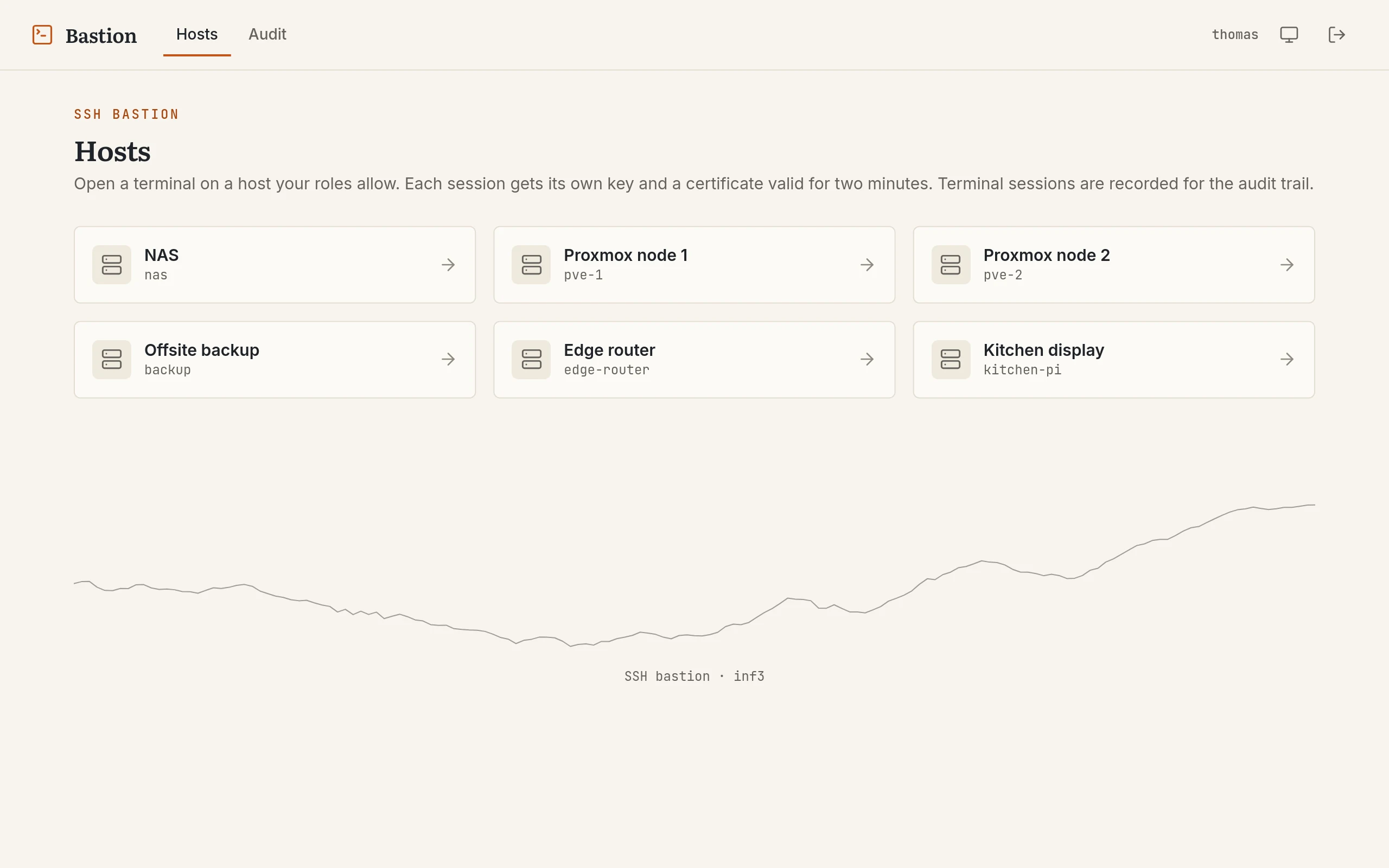
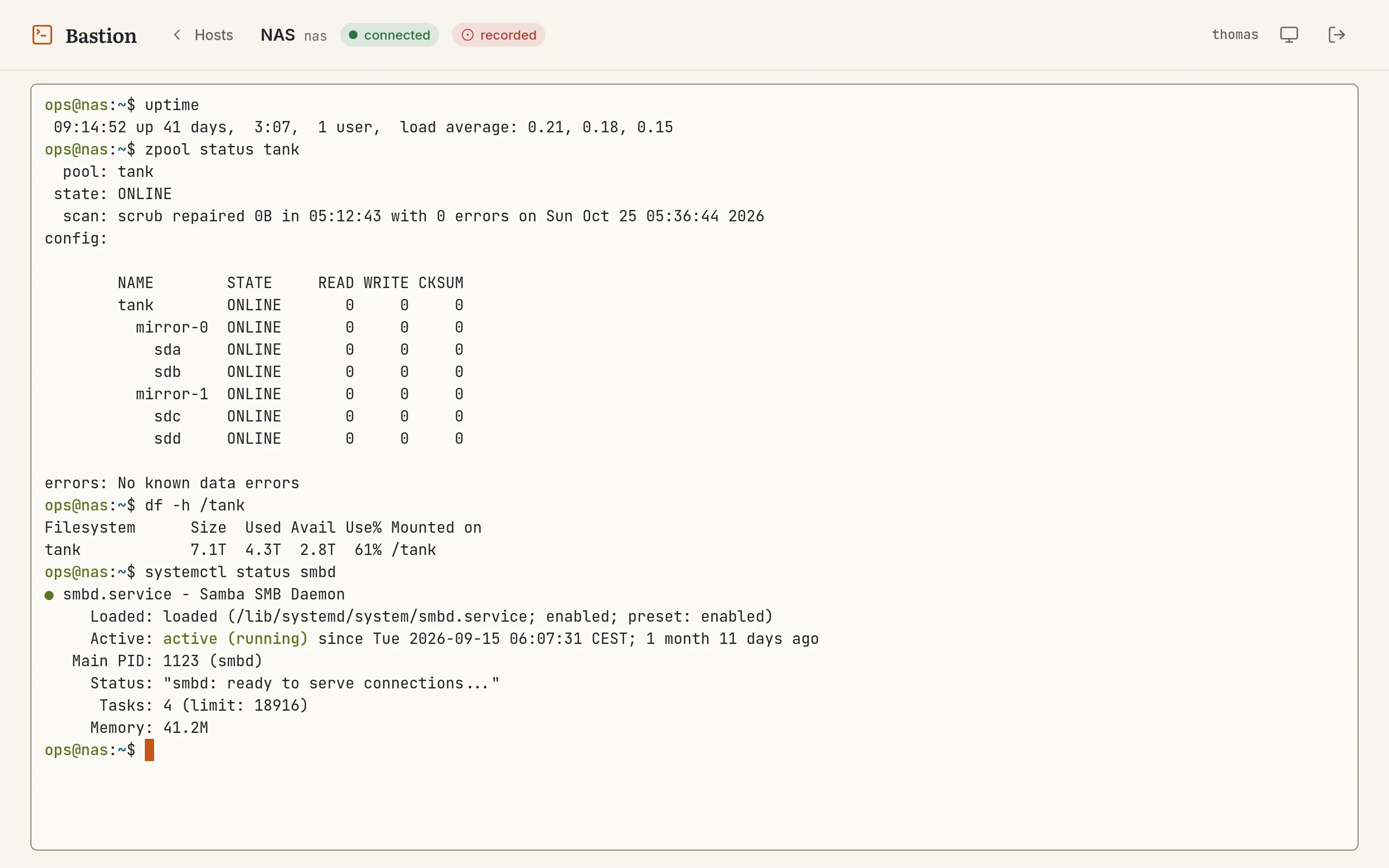
So I wrote a small web SSH bastion. You log in with Keycloak, you see only the hosts your roles allow, you click on one and you get a terminal in the browser. The bastion itself does not keep any long-lived user key: for each session it generates a new keypair and signs it with an SSH certificate authority, with a certificate valid for about two minutes. Every terminal is recorded into a separate audit service, the ledger, which keeps its events in a hash chain so that changing the history afterwards shows.
In this post, I will go through the architecture and each component: Keycloak and the login, the authorization, the certificate flow with some excerpts of the Go code, the browser terminal and a bug that took me a while to understand, the audit ledger and the session recordings, the configuration on the target hosts, the Kubernetes deployment and the limits of the current version.
Architecture
There are two services that I wrote, the bastion and the ledger, and a few components that were already running in my cluster:
flowchart TB
    browser(["Browser · xterm.js"])

    subgraph k8s["Kubernetes cluster"]
        direction TB
        traefik["Traefik · HTTPS / WSS"]
        keycloak["Keycloak<br/>client ssh-bastion"]

        subgraph ns_bastion["namespace bastion"]
            direction LR
            config[("ConfigMap<br/>hosts.yaml<br/>known_hosts")]
            bastion["Bastion (Go)<br/>login · sessions<br/>authorization · SSH CA<br/>terminal bridge · recorder"]
            secret[("SopsSecret<br/>CA key · client secret<br/>ledger token")]
        end

        subgraph ns_ledger["namespace ledger"]
            direction LR
            ledger["Ledger (Go)<br/>hash chain · sessions<br/>signed checkpoints"]
            pg[("PostgreSQL<br/>CloudNativePG")]
        end

        subgraph shared["shared services"]
            direction LR
            rustfs[("RustFS<br/>ledger-recordings")]
            loki[("Loki<br/>via Alloy")]
        end

        smarthome["Smart home<br/>(next client)"]
    end

    hosts["Target hosts · sshd :22<br/>TrustedUserCAKeys"]

    browser -- "HTTPS + WebSocket" --> traefik --> bastion
    browser -. "login redirect" .-> keycloak
    bastion -- "code + PKCE, refresh" --> keycloak
    config --> bastion
    secret --> bastion
    bastion -- "events, sessions,<br/>recording chunks" --> ledger
    smarthome -.-> ledger
    ledger --> pg
    ledger -- "recordings,<br/>checkpoint copies" --> rustfs
    bastion -. "JSON logs" .-> loki
    ledger -. "checkpoints" .-> loki
    bastion == "SSH, 2-minute certificate" ==> hosts
The bastion is a single Go binary that also serves the frontend. It does the login with Keycloak, keeps the user sessions, decides which hosts a user may open, signs the SSH certificates and bridges the browser terminal to the SSH connection.
The ledger is a small audit service with its own PostgreSQL database. The bastion sends it every security event (logins, refusals, revocations) and every terminal session with its recording. It is a separate service on purpose: somebody who takes over the bastion should not be able to rewrite what the bastion already reported, and the smart home can use the same service later.
Keycloak is the identity provider. Traefik is the ingress in front of the bastion; the ledger has no ingress at all and is only reachable from inside the cluster. RustFS is the S3-compatible object store already used by my monitoring stack, and it now also keeps the finished recordings. Loki receives the JSON logs of both services through Alloy, which gives a second copy of the audit events and of the ledger checkpoints, outside the ledger database.
Logging in with Keycloak
The authentication follows the “backend for frontend” pattern. The browser
never sees an OIDC token. The Go service does the authorization code flow
against Keycloak with PKCE, state and nonce (stored in a short-lived
encrypted cookie during the login), keeps the access, refresh and ID tokens
in its own memory and gives the browser only a session cookie. The cookie
contains the session ID encrypted with AES-GCM, using a 32-byte key passed
as SESSION_ENC_KEY. It is called __Host-session: with this prefix the
browser only accepts it with Secure, Path=/ and no Domain, so another
subdomain cannot set or overwrite it. It is also SameSite=Strict. This
works because the page itself does not need the cookie, only the API and
WebSocket calls made by the page do.
On the callback, the bastion checks the ID token, the nonce, and that the
access token was issued to its own client (azp) for the same user
(sub). The roles come from the Keycloak client roles in the access token.
The path inside the token is configurable, for example
resource_access.ssh-bastion.roles, so that the bastion only looks at the
roles of its own client and not at all the realm roles.
The first version had a real problem here: once logged in, a session ignored Keycloak until it expired. If my Keycloak session timed out, or if I disabled a user, the bastion did not notice. Now the bastion refreshes the access token shortly before it expires, and if Keycloak refuses the refresh, the bastion session ends at once. Open terminals are tied to it: every 30 seconds each one checks its session, refreshes the token when needed, and checks again that the host is still allowed. When something fails, the terminal closes with a reason, and the page shows a dialog to sign in again, keeping the terminal output on screen.
Sessions also end after 15 minutes without activity or 8 hours in total.
Typing in a terminal counts as activity, but its output does not, so a
forgotten tail -f does not keep a session open forever. Signing out also
ends the Keycloak session (with id_token_hint), and closes the terminals
of that session in every tab.
Hosts and authorization
The list of hosts and who can access them is a YAML file mounted from a ConfigMap. Each host has an ID, a label, an address and the Unix login used on the target. The policies map Keycloak client roles to host IDs:
hosts:
  - id: nas
    label: "NAS"
    address: nas.lan:22
    login: ops
  - id: pve-1
    label: "Proxmox node 1"
    address: pve-1.lan:22
    login: ops
  - id: pve-2
    label: "Proxmox node 2"
    address: pve-2.lan:22
    login: ops
  - id: backup
    label: "Offsite backup"
    address: backup.example.org:22
    login: backup
  - id: edge-router
    label: "Edge router"
    address: 192.168.1.1:22
    login: admin
  - id: kitchen-pi
    label: "Kitchen display"
    address: kitchen-pi.lan:22
    login: pi
policies:
  - match:
      roles: ["admin"]
    allow: ["*"]
  - match:
      roles: ["nas-user"]
    allow: ["nas"]
The resolution is deny by default: a user gets the union of all the
policies matching one of their roles, and * expands to all the hosts. A
user without any matching role sees an empty list. An optional
REQUIRED_ROLE can also refuse the login completely if the user does not
have a given role.
The authorization is checked again when the WebSocket is opened, and every 30 seconds while the terminal is open, not only when the host list is displayed. Knowing the ID of a host is not enough to connect to it, and removing a role in Keycloak closes the terminals it allowed.
A change of the ConfigMap is picked up within seconds. This did not work in
the first version: Kubernetes updates a mounted ConfigMap by swapping a
..data symlink, and the fsnotify watch on the file itself was lost after
the first update. The loader now watches the directory and reloads when the
symlink changes.
The same ConfigMap also contains a known_hosts file with the pinned host
keys of the targets. The bastion refuses to connect to a host whose key is
unknown or has changed. I fill it with ssh-keyscan -t ed25519 <host> and
check the fingerprint on the host itself before committing it.
The SSH certificate flow
This is the part I like the most in this project. OpenSSH has supported
certificates for a long time: instead of putting a public key in
authorized_keys, the server trusts a certificate authority, and any key
signed by this CA for an allowed principal can log in.
The CA is a normal ed25519 keypair created with ssh-keygen:
ssh-keygen -t ed25519 -f bastion_ca -N "" -C "bastion-ca"The private part goes into a Kubernetes Secret and is never committed. The public part goes on the target hosts.
Here is everything that happens when I open a terminal:
sequenceDiagram
    autonumber
    participant B as Browser
    participant X as Bastion
    participant K as Keycloak
    participant L as Ledger
    participant H as Target host

    B->>X: WebSocket /ws/ssh?host=nas&cols=120&rows=40
    X->>X: origin, session cookie, roles allow "nas"?
    opt access token about to expire
        X->>K: refresh token
        K-->>X: new tokens (or refusal: the session ends)
    end
    X->>L: start session (user, host, certificate serial)
    L-->>X: session id
    X->>X: new ed25519 keypair, certificate valid 2 minutes
    X->>H: SSH login with the certificate (pinned host key)
    X-->>B: {"type":"session","recorded":true}
    loop while the terminal is open
        B->>X: keystrokes (binary frames)
        X->>H: stdin
        H-->>X: output
        X-->>B: output
        X->>L: recording chunk every 5 s
        X->>X: every 30 s: session, token, host still allowed?
    end
    X->>L: end session (reason)
    L->>L: recording to RustFS, hash in the end event
The WebSocket handler first generates a completely new ed25519 keypair for this session only:
func GenerateEphemeralKeypair() (*EphemeralKeypair, error) {
	pub, priv, err := ed25519.GenerateKey(rand.Reader)
	if err != nil {
		return nil, err
	}
	signer, err := gossh.NewSignerFromKey(priv)
	if err != nil {
		return nil, err
	}
	pubKey, err := gossh.NewPublicKey(pub)
	if err != nil {
		return nil, err
	}
	return &EphemeralKeypair{Signer: signer, PubKey: pubKey}, nil
}
Then it signs the public key with the CA, using golang.org/x/crypto/ssh:
cert := &gossh.Certificate{
	CertType:        gossh.UserCert,
	Key:             ephemeralPub,
	KeyId:           fmt.Sprintf("%s@%s", username, sub),
	ValidPrincipals: []string{principalUser},
	ValidAfter:      uint64(now.Add(-30 * time.Second).Unix()),
	ValidBefore:     uint64(now.Add(2 * time.Minute).Unix()),
	Serial:          serial, // 64 random bits
	Permissions: gossh.Permissions{
		Extensions: map[string]string{
			"permit-pty": "",
		},
	},
}

if err := cert.SignCert(rand.Reader, ca.signer); err != nil {
	return nil, fmt.Errorf("sign cert: %w", err)
}
A few details are worth explaining. The only principal is the login of
the host from the ConfigMap, so the certificate cannot be used to log in as
another user. The KeyId contains the Keycloak username and subject, and
sshd writes it with the serial when it accepts the certificate:
Accepted publickey for ops from 10.42.3.17 port 54046 ssh2:
  ED25519-CERT SHA256:Llnk… ID alice@8a1c… (serial 16159163563268877563) CA ED25519 SHA256:AhKw…
The serial is also stored in the ledger with the terminal session, so a line
in the log of the host leads to the recording of the session. The validity
starts 30 seconds in the past to tolerate a bit of clock skew between the
pod and the host, and ends two minutes in the future. The only extension is
permit-pty: no agent forwarding, no port forwarding, no X11.
The certificate and the ephemeral private key are then combined into a signer and used for a normal SSH connection:
certSigner, err := gossh.NewCertSigner(cert, kp.Signer)
// ...
cfg := &gossh.ClientConfig{
	User:            host.Login,
	Auth:            []gossh.AuthMethod{gossh.PublicKeys(certSigner)},
	HostKeyCallback: hostKeyCallback, // from the pinned known_hosts
	Timeout:         15 * time.Second,
}
The keypair only lives in the memory of the handler and disappears with the connection. If the host is down or refuses the certificate, the bastion closes the WebSocket with its own code (4502) and the page says that the host cannot be reached. The details, like the address or a host key mismatch, only go to the log.
One small problem I had was with the host key algorithms. If the server
offers another key type than the one pinned in known_hosts (for example
ECDSA when I only scanned the ed25519 key), the Go client fails with a key
mismatch. The dialer now probes the known hosts callback with a throwaway
key to find which key types are pinned for the address, and only advertises
those in HostKeyAlgorithms.
The terminal in the browser
The frontend is a small TypeScript application built with Vite and embedded in the binary. It uses Field Notes, the design system I use for all my sites and apps, so it has the same fonts, colours and light and dark themes. Even the terminal colours come from the design tokens, and xterm.js raises any colour that would be hard to read on the background to a contrast of at least 4.5:1.
The page asks for the terminal with its size in the URL, so the shell starts with the right number of columns instead of 80. Keystrokes go to the bastion as binary WebSocket frames, and text frames are kept for control messages: size changes from the browser, and the bastion telling the page whether the session is recorded.
For a while, I had a strange bug: sometimes a letter did not appear while I typed, and when I pressed the up arrow to recall a command, the line was mangled, with stray letters left over. The SSH side was fine: I tested the bridge against a real sshd and no keystroke was lost. The cause was the 🌐 that my prompt (Starship) shows on SSH connections. glibc counts this emoji as two columns wide, but xterm.js uses the Unicode 6 width tables by default and draws it in one column. Readline and the terminal then disagree by one column about where the cursor is. As soon as a line wraps or readline redraws it, characters land one column off and overwrite each other. Loading the Unicode 11 width tables in xterm.js fixed it:
const term = new Terminal({ allowProposedApi: true, /* … */ })
term.loadAddon(new Unicode11Addon())
term.unicode.activeVersion = '11'
The bastion also sends LANG=C.UTF-8 and the IUTF8 terminal mode, which a
normal SSH client does too. Without them, a shell on a host without a
default locale treated accented characters as Meta key combinations.
The audit ledger
The first version only wrote audit events to its log. That is useful, but the log is mixed with everything else, and nothing prevents somebody from changing it. I also wanted to record what happens in the terminals. So I wrote the ledger, a separate Go service with a small HTTP API:
- an app posts single events, like
auth.loginorauthz.deny; - or it starts a session, gets its ID, sends recording chunks and heartbeats, and ends it;
- and it reads its own events and sessions back, with filters.
Each app has its own token, and only ever sees its own data. The API is described in OpenAPI, and the tests check that the description matches what the service really answers.
All the events of an app form a chain. Each event has a number and a SHA-256 hash that covers the previous hash and every field of the event:
func Hash(prev string, e Event) string {
	payload, _ := json.Marshal([]any{
		"ledger/v1", e.App, e.Seq, e.ID, e.TS.UTC().Format(TimeFormat), e.Type,
		e.ActorSub, e.ActorName, e.SrcIP, e.SessionID, e.Data,
	})
	h := sha256.New()
	h.Write([]byte(prev))
	h.Write([]byte{'\n'})
	h.Write(payload)
	return hex.EncodeToString(h.Sum(nil))
}
Changing an event, removing one or swapping two breaks every hash after
it. It looks a bit like a blockchain, but with a single writer there is no
need for consensus: a hash chain gives the same tamper evidence. Somebody
with access to the database could still recompute the whole chain after a
change. Against this, the ledger signs the head of each chain with an
Ed25519 key every ten minutes, and writes these checkpoints to its log (so
they also land in Loki) and to the RustFS bucket. A rewritten chain would
not match these copies. The tables also refuse UPDATE, DELETE and
TRUNCATE with a trigger, which does not stop a database owner but stops
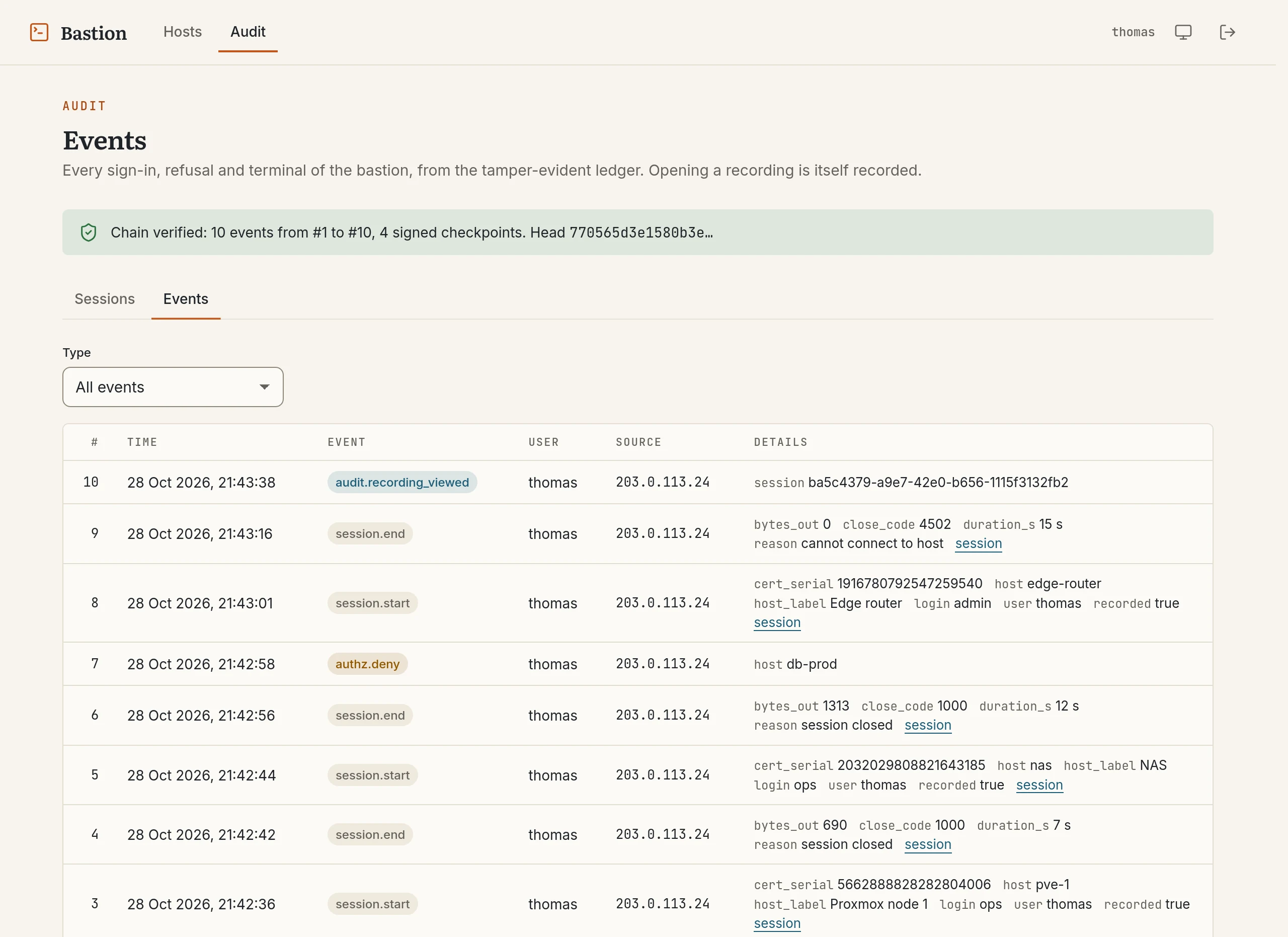
mistakes. The audit page of the bastion runs a full verification and shows
how many events and signed checkpoints it checked.
Old data is removed after a year for the events and 90 days for the recordings. This needs some care with a hash chain: the ledger only cuts the chain at a signed checkpoint, which then becomes the start of what is kept, so the rest still verifies. Removing a recording leaves an event with its hash in the chain.
Session recording
Every terminal is a ledger session. The bastion records it in the asciicast v2 format of asciinema: one JSON line per event, with the time since the start.
{"version":2,"width":120,"height":40,"timestamp":1793059298,"title":"NAS"}
[0.512000, "o", "ops@nas:~$ "]
[3.104000, "m", ""]
[3.118000, "o", "systemctl status smbd\r\n"]
[4.020000, "r", "140x40"]
o is output, r is a change of the terminal size and m is a marker. The
bastion never records what is typed, only what the terminal shows. A
password typed at a sudo prompt is not echoed, so it never reaches the
recording. Instead, the bastion adds a marker each time Enter is pressed,
which is enough to jump from command to command when watching it.
The recording goes to the ledger in chunks every five seconds, with a
heartbeat when nothing happens. While the session is open, the chunks are
kept in PostgreSQL. When it ends, the ledger joins them, compresses them,
stores the file in RustFS, and writes its SHA-256 in the session.end
event. If the bastion crashes, the ledger stops receiving chunks and
heartbeats, ends the session after five minutes as abandoned, and keeps what
it received. When the bastion is stopped normally, for example during an
update, it ends the open terminals itself, so their recordings are complete.
If the ledger cannot be reached when a terminal is opened, the bastion refuses the terminal instead of opening one without a recording. The same applies later: if the recording stops, for example because somebody prints enough output to reach the size limit, the terminal is closed. The page says so, and the refusal itself is sent to the ledger when it is back. Users see a “recorded” badge next to the host name, so nobody is surprised.
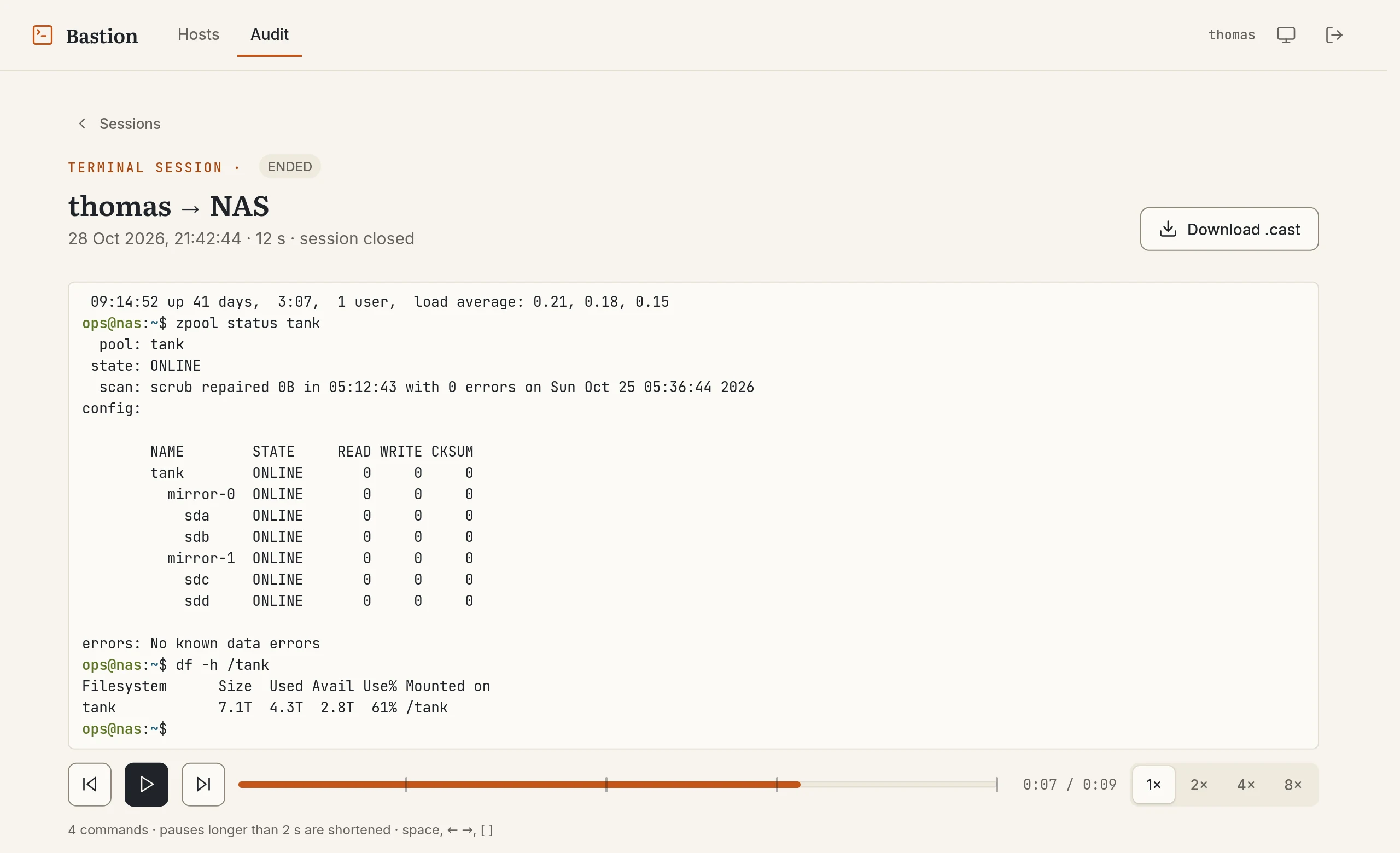
Users with the auditor or admin role get an Audit page in the bastion.
It lists the terminal sessions, which can be filtered by user and host, and
all the audit events. Each session has a player built on xterm.js with the
same Unicode 11 setup as the live terminal, with long pauses shortened and
buttons to jump between commands. Opening a recording is itself recorded in
the ledger.
Trusting the CA on the target hosts
On each target, the configuration is one line in /etc/ssh/sshd_config
and a file with the CA public key:
TrustedUserCAKeys /etc/ssh/trusted_user_ca_keyscat bastion_ca.pub >> /etc/ssh/trusted_user_ca_keys
systemctl reload sshdThe login user referenced in the ConfigMap must exist on the host. No
authorized_keys entry is needed for the bastion. Since
TrustedUserCAKeys accepts several keys, the rotation of the CA is simple:
add the new public key on all hosts, update the Secret and restart the
bastion, and remove the old key once no certificate signed by it can still
be valid, which is a few minutes later.
Kubernetes deployment
Both images are built the same way: a Go stage (plus a Node stage for the
bastion frontend) and a
distroless static
image for the runtime. My Woodpecker CI builds them with kaniko and pushes
them to the Forgejo registry on each push to master. The ledger pipeline
also runs its tests against a PostgreSQL service container and lints the
OpenAPI description.
Both Deployments run as UID 65532, with a read-only root filesystem, no capabilities and the default seccomp profile:
securityContext:
  allowPrivilegeEscalation: false
  readOnlyRootFilesystem: true
  capabilities:
    drop: ["ALL"]
env:
  - name: OIDC_ISSUER_URL
    value: "https://keycloak.example.org/realms/home"
  - name: OIDC_CLIENT_ROLES_PATH
    value: "resource_access.ssh-bastion.roles"
  - name: SSH_CA_KEY
    value: "/secrets/ssh-ca-key"
  - name: HOSTS_CONFIG
    value: "/config/hosts.yaml"
  - name: LEDGER_URL
    value: "http://ledger.ledger.svc:8080"
  - name: LEDGER_TOKEN
    valueFrom:
      secretKeyRef:
        name: bastion-secrets
        key: ledger-token
The CA private key, the OIDC client secret, the session encryption key and
the ledger token are in a Secret, which I commit encrypted with
SOPS and an age key, like the other
secrets of my cluster. The
sops-secrets-operator
decrypts the SopsSecret in the cluster and creates the Secret. The ledger
has its own: the Ed25519 signing key and the RustFS credentials. Its
database is a CloudNativePG cluster, like my
other PostgreSQL databases, and the ledger only stores the SHA-256 of the
app tokens in its configuration.
NetworkPolicies restrict both pods. The ledger accepts connections only from
the bastion and iot namespaces and only talks to its database, RustFS and
DNS. The bastion talks to DNS, Keycloak on 443, the ledger and the targets on
22.
Trade-offs and limits
This is a tool for my home network, and it has some limits I want to be clear about.
The sessions are stored in memory. A restart of the pod logs out everybody and closes all the open terminals, and it is also the reason why there is only one replica. For my usage this is fine, but scaling it would need a shared session store.
The two-minute validity of the certificate only protects the authentication. sshd checks the certificate when the connection is opened; an established session continues after the certificate has expired. What ends it is the bastion: the user closing the tab, the idle timeout, the Keycloak session ending, the role being removed, or the pod stopping.
The bastion notices a Keycloak logout at the next token refresh, so within one access-token lifetime (five minutes by default in Keycloak). Keycloak can call a back-channel logout endpoint to make this immediate; that is not done yet. If Keycloak itself is down, sessions keep working for five more minutes after their token expired, and then access is refused until Keycloak answers again: a user I disable during an outage does not keep their access.
The CA private key is the important secret here. Anybody who can read it
can sign certificates for any principal on all the hosts that trust it.
It lives in a Secret in the cluster, so the access to the bastion
namespace must be restricted accordingly. Another option would be to set
AuthorizedPrincipalsFile on the hosts to limit which principals are
accepted from this CA.
All users allowed on a host share the same Unix login. The KeyId and the
serial in the sshd log, together with the ledger, are the way to know who did
what. The recordings show what the terminal displayed, which can include
secrets printed to the screen, so they are only visible to auditors and kept
for 90 days.
The ledger proves that its history was not changed, as long as its signing key and the copies of the checkpoints are safe. It runs in the same cluster as the bastion; copying the checkpoints to a machine outside the cluster would make it stronger.
Conclusion
After the setup, adding a host is quick: an entry in the ConfigMap, its
host key in known_hosts and the CA public key in sshd_config on the
host. I no longer need to copy SSH keys around, and the bastion never holds
a key that would still be useful after a few minutes, apart from the CA
itself. And for every terminal I now know who opened it, from where, and
what it showed.
I have been using it for a few months now, and improved it bit by bit along the way. It already got me out of a few sticky situations, like the day I broke the VPN configuration and was able to resolve this using a shell at home.
Next steps are the back-channel logout from Keycloak and sending the audit events of the smart home to the same ledger.